Blog ·
How does crafting work in Minecraft?
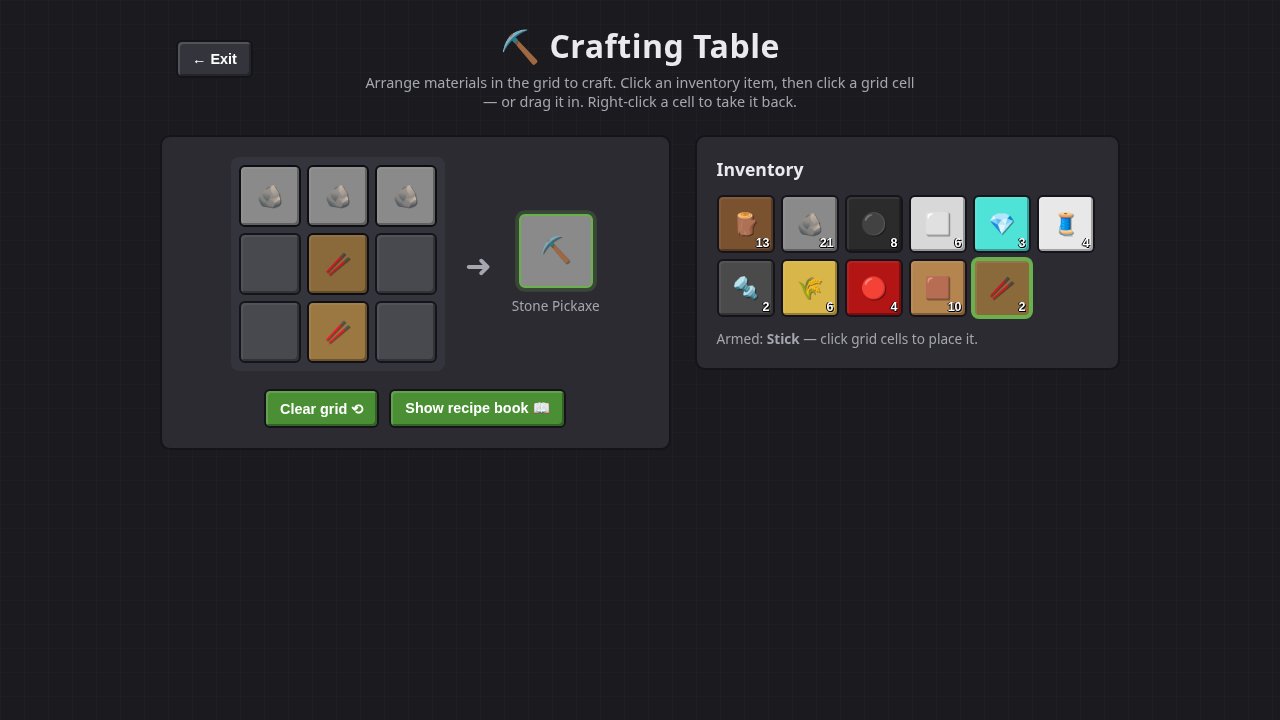
Crafting in Minecraft means placing items on a crafting grid: a small 2x2 grid that is always in your inventory, or a larger 3x3 grid on a crafting table. The game compares what you placed with its list of recipes, and when they match, the result appears beside the grid for you to take. Most recipes are "shaped" (the items must form a particular pattern), and some are "shapeless" (only the ingredients count, not where they sit). Your first crafting table takes four wooden planks, and once you have one, every recipe in the game is open to you.
What is the difference between the 2x2 and 3x3 grids?
Every player has a 2x2 crafting grid on their inventory screen, and a crafting table opens a larger 3x3 grid. Anything that fits in a 2x2 square, such as planks, sticks, torches or the crafting table itself, can be made in either one; the Minecraft Wiki notes that recipes fitting the 2x2 grid also work on the table's 3x3. Anything wider or taller, such as a pickaxe, a chest or a furnace, needs the table.
| You want | Grid you need |
|---|---|
| Planks, sticks, torches, a crafting table | 2x2 (your inventory) or 3x3 |
| Pickaxes, axes, swords, chests, furnaces, ladders, bows | 3x3 (a crafting table) |
How do you make a crafting table?
Turn a log into planks (one log gives four planks), then put four planks in your 2x2 grid, one in each square. The game's own achievement text describes it as crafting a table "with four blocks of wooden planks". The table has been in the game a long time: the wiki records it arriving as a "workbench" in Java Edition Indev 0.31, and renamed Crafting Table in Beta 1.2.
What is a shaped recipe?
Most recipes are shaped: the items have to sit in the right places relative to each other. A pickaxe is three of a material across the top with two sticks down the middle, as in the image above; a sword is two of the material over one stick. The wiki says most recipes need their ingredients "in the correct relative positions".
Two things make shaped recipes forgiving:
- The pattern can sit anywhere. A recipe smaller than the grid can be moved up, down, left or right and still work. A sword in the left column is as good as one in the middle.
- Many patterns can be mirrored. Recipes can be flipped horizontally, but not vertically, so an axe with its head on the left works as well as one with its head on the right. Microsoft's add-on documentation for Bedrock Edition shows how this is built in: a shaped recipe has a setting called
assume_symmetry, on by default, that treats a symmetrical recipe as giving the same result, and a creator can switch it off to give the mirrored version its own result.
What is a shapeless recipe?
A shapeless recipe only cares which items are on the grid and how many, not where. Microsoft's documentation for the shapeless recipe type notes that it uses no pattern at all, just a list of ingredients and a result. Turning a log into planks works this way: one log anywhere on the grid gives you planks.
Under the hood, a recipe in Bedrock Edition is a small data file. A shaped one has a pattern (rows of characters), a key that says which item each character stands for, a result, and tags naming what can craft it, such as crafting_table, according to Microsoft's reference. That is how add-on makers add recipes of their own.
What does the recipe book do?
The recipe book is a button beside the crafting grid that opens a list of the recipes you have unlocked. According to the wiki, recipes unlock when you meet certain criteria, usually holding a particular item, and a toggle switches between showing every unlocked recipe and only the ones you can craft right now. It arrived in Java Edition 1.12 and Bedrock beta 1.2.0.2. You never have to use it: placing items by hand always works, unless a world has the doLimitedCrafting rule on, which allows only unlocked recipes.
Can crafting be automatic?
Yes, with the crafter, a block added in Java Edition 1.21, Tricky Trials. You fill its 3x3 grid, and when it gets a redstone signal it crafts and ejects the result. The wiki notes that the crafter can craft anything a normal crafting table can. The crafter itself is made from an iron ingot, a crafting table, redstone dust and a dropper.
Where can you try a crafting grid in your browser?
Our free Crafting Table is a 3x3 grid with 22 recipes from the game, from planks and sticks to iron and diamond tools, with nothing to download. Click an item in your inventory, then click the squares to place it (or drag it in), and right-click a square to take it back; the "Show recipe book" button lists every pattern. It checks recipes the same two ways Minecraft does: a shaped pattern matches wherever you put it in the grid, and a shapeless one (a log into four planks) matches in any square. One difference: our table does not yet accept mirrored patterns, so an axe needs its head on the left.
If you like building in blocks, Kyra Craft is our voxel adventure with caves, monsters and pets, and Heartworld is a shared voxel world you build in with other players. And for the game that started it all, see the Minecraft page on our game hub, with games it inspired.
More from the blog
 Why are browser games silent until you click?Browsers block sound on a page until you interact with it, so a web game cannot play audio before your first click, tap or key press. Here is how the rule works and why it exists.
 What is procedural generation in games?Procedural generation means a game builds its levels, maps or worlds with rules and random numbers instead of storing each one made by hand. Here is how it works, what a seed is, how Rogue, Elite, Minecraft and No Man's Sky used it, and three browser games where you can see it.
 What was the first computer RPG?The earliest computer role-playing game that still survives is pedit5, also called The Dungeon, written by Rusty Rutherford on the PLATO system at the University of Illinois in 1975. Here is how it played, the rival that followed it, the lost game called m199h, and where you can try them today.